

Free Windows installation program
Windows 7 USB DVD Download Tool is a free utility program that creates bootable USB flash drives or DVD for Windows 7 32- and 64-bit operating systems. When people install Windows systems from the Microsoft Store, they can either download a collection of compressed installation files or an uncompressed ISO file; the freeware is developed by Microsoft to install the ISO file onto a PC machine.
Top Recommended Alternative

Does Windows 7 USB DVD Download Tool work Windows 10?
The application functions with Windows 7, 8, and 10 systems along with Windows Vista and XP SP2 models. If the Windows XP users intend to operate the app, then there are applications to install before: Microsoft .NET Framework 2.0 and Microsoft Image Mastering API v2. Along with the Windows USB DVD Download Tool, people will need to have purchased and downloaded the Windows ISO file.
The system requires 50 MB of storage space on the hard disk as well as a DVD-R drive or removable USB device with a minimum of 4 GB available. Essentially, users need the ISO file, the download tool, and either the blank DVD drive or the 4GB or higher USB.
How do I convert Windows ISO to USB?
The lightweight platform has an easy to use interface; fundamentally, the program is created for people who are not adept in technical skills for them to perform the process. If the Microsoft community does need assistance, then within the user interface there is an ‘Online help’ option. Essentially, the tools Windows offers in the app are presented in four steps.
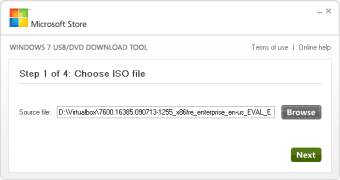
Each step is displayed on a small and simple interface. Lining the top of the tool is the distinction of which step the user is on within the procedure. Upon the download, Windows greets people with a screen that reads ‘Step 1 of 4: Choose ISO file’. Below the instruction is a space to either insert or searches for the source file with the browser.
Once the article is retrieved, ensure that the encased space presents the correct information. If the data is accurate, then press the green ‘Next’ button in the bottom right corner to continue. The setup continues into ‘Step 2 of 4’ on the following page: ‘Choose media type’.
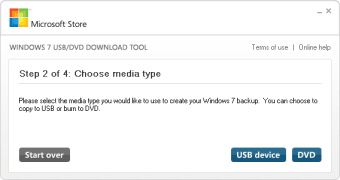
The directions inform the community that they can either burn the ISO file to a DVD or copy the uncompressed file to a USB Pendrive. If people are using the USB backup, then they need to utilize a USB that has 4GB or more to ensure that the file size is compensated for.
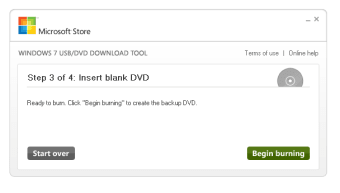
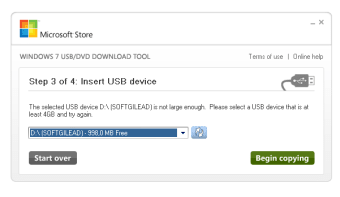
To be allowed to continue, select either ‘USB device’ or ‘DVD’ in the lower right corner. Confirm that the DVD or USB is placed into the computer. Note that there is a ‘Start over’ button presented in the lower-left section to restart the boot order. Step 3 includes a dropdown menu to verify the inserted media.
If the USB or DVD information is not visible, then there is a refresh key that can be chosen beside the menu. Ensure that any content that is within the external devices is safely copied to another location. If there is data on the equipment, then a message will appear to notify the user that there is not enough disk space to continue.
How do I create a bootable flash drive?
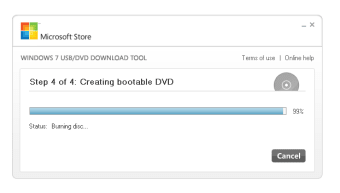
Either choose the erase route or cancel the operation. Once the disc or drive has been identified, click ‘Begin copying’. The final step is creating the bootable drive. A loading bar will be placed in the center of the page that details the progress of the root folder being combined with the DVD or USB port equipment.
When the integration is complete the window will display the text: ‘Bootable USB device created successfully’. To the right of the loading bar ‘100%’ will be present and below the bar, the status will read ‘Backup complete’.
Additional installer program
Rufus creates bootable discs and drives in a variety of formats. As the developer, Microsoft created the Windows USB DVD Tool for their single existing operating system: Windows 7, 8, 10, etc. Rufus is an impressive option that is recommended for anyone that wishes to create bootable equipment for free on other systems: Linux, UEFI, etc.
Follow the steps to install
The Windows USB DVD Download Tool provides succinct steps that are individually presented to install their system with a DVD or USB drive. There are four steps total.
This tool is compatible with the Windows 7 OS and above. Visit their official site to view any new versions and updates as well as the latest company news, terms, etc.














.jpg)